A recent screenshot circulating online has led many Windows 11 users to believe that Microsoft is secretly running AI in the background, consuming system resources. However, reports suggest this is a misunderstanding of a new settings page designed for managing AI permissions.
Misunderstanding AI Settings in Windows 11
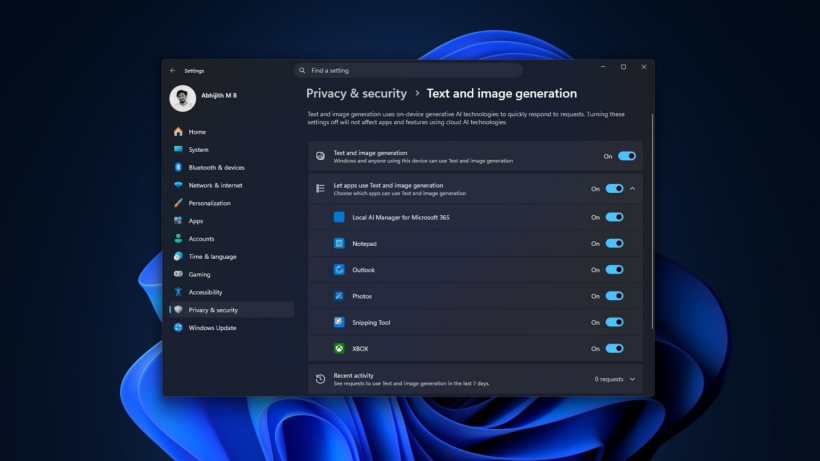
The screenshot, which has garnered millions of views, appears in the Settings > Privacy & Security > Text & Image Generation section of Windows 11. It lists several built-in applications, including Notepad, Photos, Snipping Tool, and Outlook, alongside a setting related to on-device AI. This has fueled speculation and fear among some users, with claims that Microsoft is running AI without consent, potentially impacting gaming performance.
Some online posts have even leveraged this to promote Windows optimization services, alleging that the hidden AI activity is dragging down PC performance. However, a closer examination reveals that these claims are largely unfounded.
Clarifying the Purpose of the AI Settings Page
According to WindowsLatest, the crucial detail being overlooked is the “Recent Activity” section on the same page. This section reportedly shows “0” requests, indicating that no AI tasks are actively running or consuming resources.
Microsoft’s official documentation clarifies that this settings page is intended to track which applications have utilized the on-device generative AI models provided by Windows. Its primary function is to allow users to manage and control which apps have permission to use these AI capabilities, not to show apps that are currently executing AI tasks.
The page “displays apps that have recently used on-device generative AI models provided by Windows” and allows users to “choose which apps can use generative AI features.”
The distinction between an app having permission to use AI and an app *actively using* AI is significant. Applications listed on this page may simply possess the capability to interact with AI models, but they are not necessarily generating text or images at that moment.
The Role of NPUs and On-Device Processing
Furthermore, the emphasis on “on-device” processing is a key point often ignored in the viral posts. Microsoft has designed these features to run on the Neural Processing Unit (NPU) found in Copilot+ PCs. These specialized chips are built to handle AI workloads efficiently, with Copilot+ PCs requiring NPUs capable of 40 TOPS or higher performance.
This means that even when AI generation occurs, it’s offloaded to the NPU, rather than burdening the CPU, GPU, or standard system memory. While not all Windows AI features are currently exclusive to Copilot+ hardware—some, like Phi Silica, can run on certain NVIDIA and AMD GPUs—the settings page specifically pertains to Windows’ built-in models.
Tests conducted on non-Copilot+ PCs without NPUs, by toggling the setting and monitoring memory usage, showed no discernible impact, further supporting the claim that the AI is not running in the background.
Identifying Misinformation and Marketing Tactics
A deep dive into the widely shared screenshots reveals that the “AI settings” show zero requests, implying no AI models were actually executed. If AI inference tasks were continuously running in the background, there would be a consistent record of requests, contradicting the “0 requests” data.
The misinformation appears to be amplified by accounts like ParagonTweaks, which have posted claims that Windows is reducing PC performance for gaming and streaming due to AI. These posts often conclude by directing users to purchase paid optimization tools, suggesting a marketing tactic to exploit user concerns.
In conclusion, the Windows 11 “Text & Image Generation” settings page is a feature for managing AI permissions, not a direct indicator of background AI activity. Users should be wary of sensationalized claims and focus on the actual functionality and intended purpose of these new Windows features.