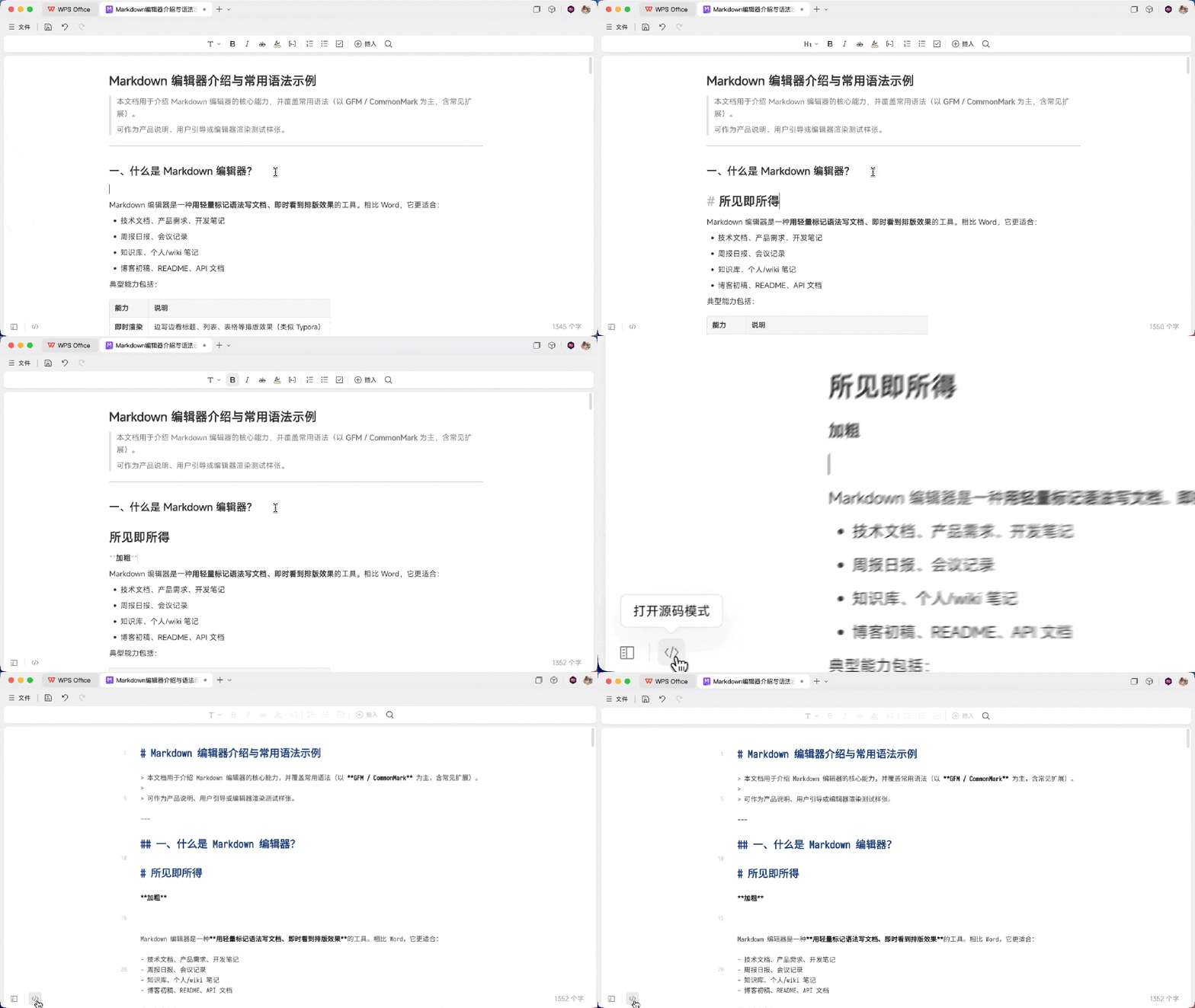
WPS has officially announced that its office suite now supports Markdown file editing and previewing across Windows, Mac, and its web version. This move aims to cater to the growing user base of Markdown, largely driven by the proliferation of AI tools.
Comprehensive Markdown Integration
Users can now open, edit, and save Markdown files directly within WPS. The new functionality includes support for both source code view and a WYSIWYG (What You See Is What You Get) editing mode, offering flexibility for different user preferences. Key Markdown elements such as headings, emphasis, lists, quotes, tables, images, links, and code blocks are all supported for editing on PC and web platforms.
A significant addition highlighted by WPS is the inclusion of formula support and Mermaid chart capabilities, features that were frequently requested during early testing phases. The integration also comes with a new dark mode, which can be set to follow the host theme of WPS or Kingsoft Document. For enhanced usability, an “Efficiency Guide” has been added to the bottom right corner of the document, providing quick access to common syntax and shortcuts, and can be toggled on or off.
Platform and Version Requirements
To access these new features, users need to ensure their WPS applications are updated to the latest versions. Specifically, the Mac version requires an update to 12.1.26050 or later, while the Windows version needs to be at least 12.1.0.28040 or later.
Opening a Markdown file (.md) is straightforward. Users can right-click on the file and select “Open with WPS Office,” navigate to the file through the “Open” option on the WPS homepage, or simply drag and drop the file onto the WPS homepage.
The AI Connection
WPS attributes the timely addition of Markdown support to the increasing prevalence of AI and Agent technologies. As AI tools are frequently used for organizing information, generating reports, and performing various tasks, they often produce or save files in Markdown format. Consequently, more general users are encountering .md files and have actively requested WPS support for this format.
The integration of Markdown support is directly linked to the rise of AI. When AI assists in organizing data or generating reports, it commonly outputs or saves files as Markdown. This has led to a growing number of ordinary users encountering .md files and requesting WPS to support this format.
This integration streamlines the workflow for users interacting with AI. Instead of needing a separate editor, AI-generated Markdown files can be opened and edited directly in WPS. The edited files can then be sent back to the AI for further processing. WPS also ensures that when an AI updates a file, users within WPS will be promptly notified of the changes.
Future Features and Current Limitations
While WPS has made significant strides with this update, certain features are still under development. Functions such as dual-linking, side-by-side comparison with left/right columns, direct creation of new Markdown files, and exporting to other formats are not yet available. However, WPS has indicated that most of these functionalities are already scheduled for development, with a goal to implement them within the current year.
The introduction of robust Markdown support positions WPS as a more versatile tool for a modern digital workflow, especially for those leveraging AI for content creation and data management.