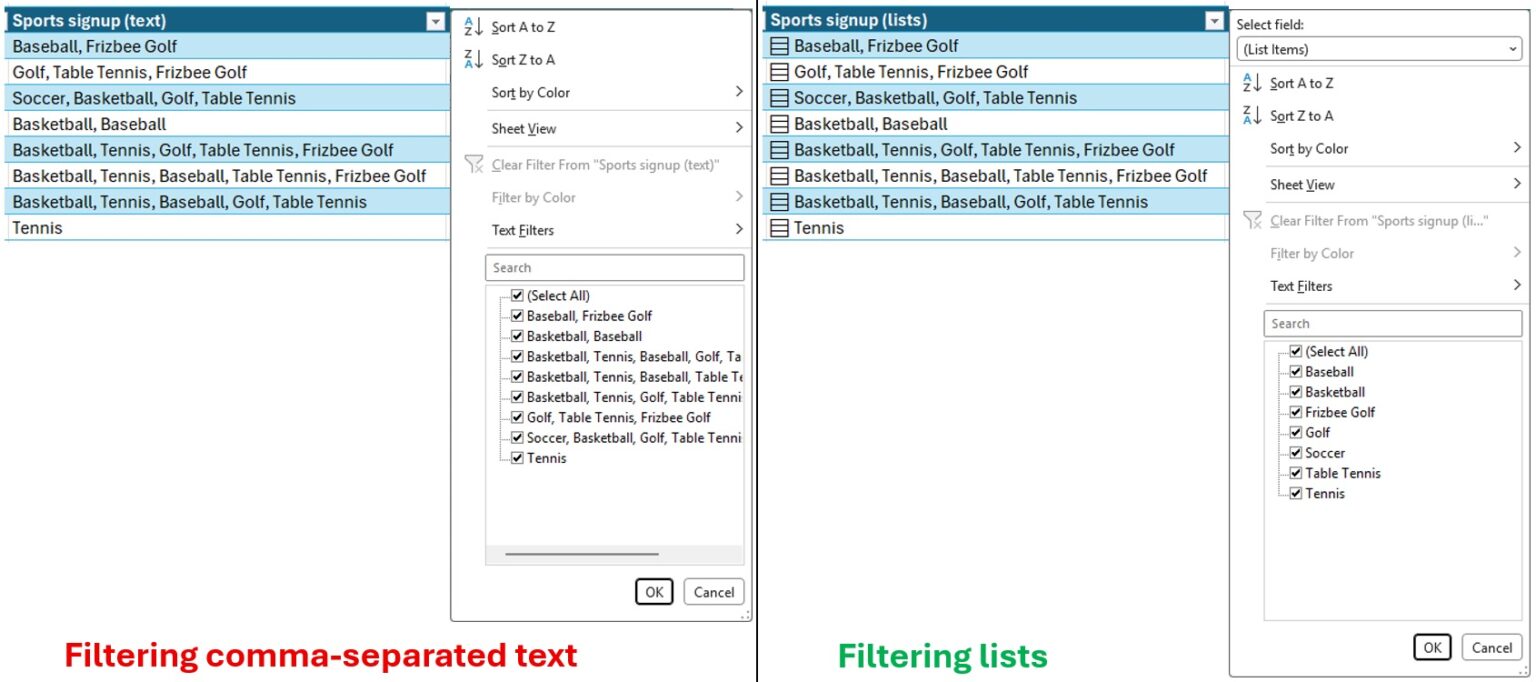
Microsoft is shaking things up in the world of spreadsheets. For decades, Excel has adhered to the rule of a single value per cell. However, a new feature currently in testing aims to change that, allowing users to store multiple items like names, locations, or tags directly within a single cell.
A Long-Standing Convention Reimagined
Traditionally, if you entered something like “Carlos, Henrietta, Jacob” into an Excel cell, the software would treat the entire string as one piece of text. To sort or filter these individual names, users would typically have to split them into separate cells, a process that could be cumbersome and time-consuming, especially for large datasets.
This new functionality, reported by Windows Latest, introduces the concept of ‘multivalue cells’ or lists within a cell. Users will be able to create these lists either by navigating to ‘Insert > List’ or by using a new keyboard shortcut, Ctrl+J. When entering or pasting data, items can be separated by commas or semicolons, depending on regional settings.
Enhanced Filtering and Data Analysis
The true power of this change lies in its impact on data analysis and filtering. With multiple items in a single cell, users can now filter records based on individual components within that list. For example, if a cell contains “Carlos, Henrietta, Jacob,” you could specifically filter to find only records associated with “Carlos,” without needing to manually rearrange your data.
New Functions to Support Multivalue Cells
To complement this new feature, Microsoft is introducing four new functions designed to work with these lists:
- HAS: This is a new logical function that checks if a specified item exists within a list in a given cell. For instance, if cell D2 contains a list of project leads, the formula
=HAS(D2, "Carlos")would return TRUE if “Carlos” is in that list, and FALSE otherwise. This function is ideal for conditional checks in scenarios like task assignments, qualification tracking, or customer interest analysis. - HASANY and HASALL: These functions extend the checking capability to multiple specified items.
HASANYreturns TRUE if any of the specified items are found in the target list, making it useful for filtering records that meet at least one criterion.HASALL, on the other hand, returns TRUE only if all specified items are present in the list, which is beneficial for verifying if an employee possesses all necessary qualifications for a task. - FLATTEN: This function is designed to simplify nested arrays. Nested arrays occur when a list contains other lists or multiple levels of data.
FLATTENreorganizes this hierarchical content into a more manageable structure, making it easier to work with data aggregated from multiple cells or prepare it for subsequent analysis and calculations.
These new functions, combined with the ability to store multiple values in a cell, promise to significantly streamline workflows for many Excel users. By reducing the need for data pre-processing and enabling more direct filtering and conditional logic, Microsoft is offering a powerful upgrade that could fundamentally change how users interact with their spreadsheets.
The introduction of multivalue cells and supporting functions marks a significant departure from Excel’s long-standing conventions. While the feature is still under testing, its potential to enhance efficiency and analytical capabilities for users across various industries is undeniable.