Microsoft appears to be phasing out its dedicated PC-to-PC migration tool for Windows 11, just about a year after its introduction. Reports indicate that a recent preview build, Windows 11 Build 26×00.9539, has removed this functionality.
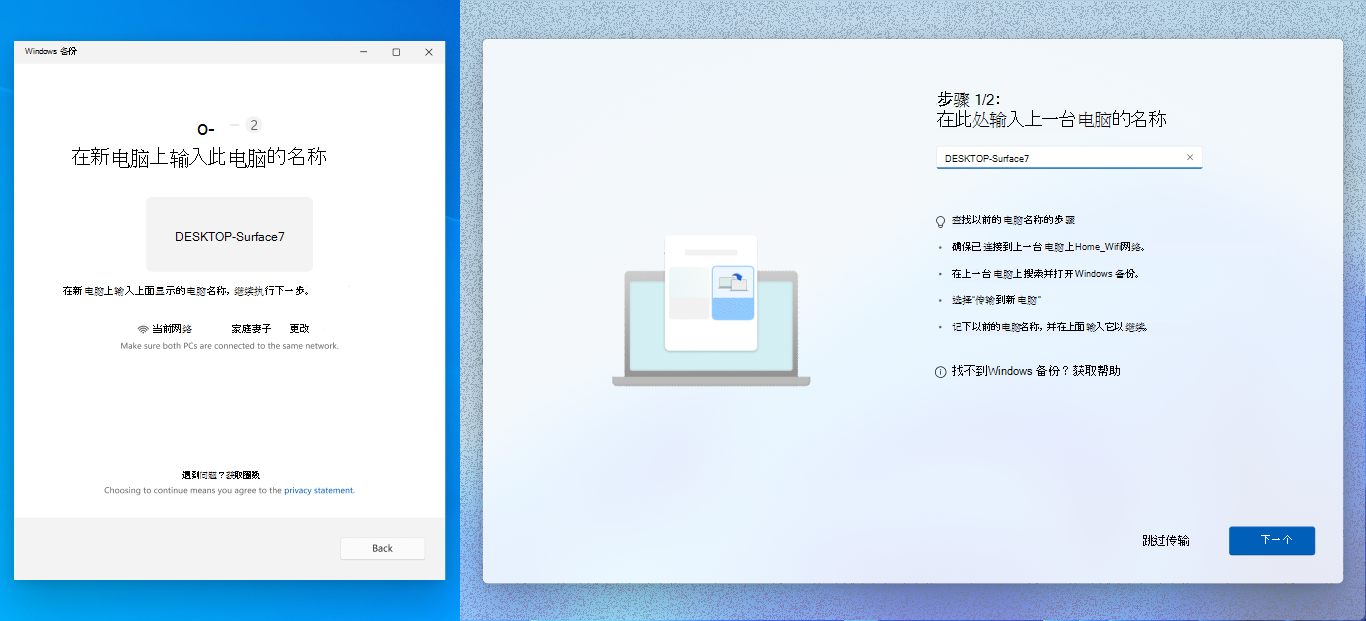
The PC migration tool was initially rolled out via an optional update, KB5060829, in June 2025, and then officially integrated into the cumulative update for Windows 11 Build 226×1.5624 in July. Its purpose was to simplify the process of transferring data and settings between computers over a local network. Users could connect their PCs, authenticate using a PIN, and wirelessly back up and transfer files.
The process involved users finding their previous computer’s name within the Windows Backup application on the old machine. On the new PC, a one-time code would then be displayed, which needed to be entered into the Windows Backup app on the original computer to initiate the transfer. Users then had the flexibility to choose exactly what content they wanted to move.
However, according to the latest update logs, Microsoft is now recommending users switch to the standard Windows Backup feature for migrating data between PCs. This shift suggests a consolidation of backup and migration functionalities within the operating system.
While the exact reasons for deprecating the dedicated migration tool are not explicitly stated, this move could be part of Microsoft’s ongoing efforts to streamline its software offerings and reduce redundancy. By pushing users towards the more general Windows Backup tool, Microsoft might be aiming for a more unified user experience and a simpler maintenance strategy for its backup solutions.
The Windows Backup feature itself has seen improvements over time, offering cloud-based backup options in addition to local transfers. It allows users to back up important files, settings, and app data, making it a comprehensive solution for both initial setup and data migration.
For users who relied on the specific PC-to-PC migration tool, the transition to Windows Backup should be relatively smooth. The core functionality of transferring data is still available, albeit through a different application interface. It remains to be seen whether Microsoft will integrate any of the specific features of the removed tool more deeply into the Windows Backup application in future updates.
This development highlights Microsoft’s dynamic approach to software development, where features are introduced, refined, and sometimes retired based on user adoption and strategic direction. The company’s focus seems to be on providing robust and integrated solutions that cater to a wide range of user needs without overwhelming them with multiple, overlapping tools.