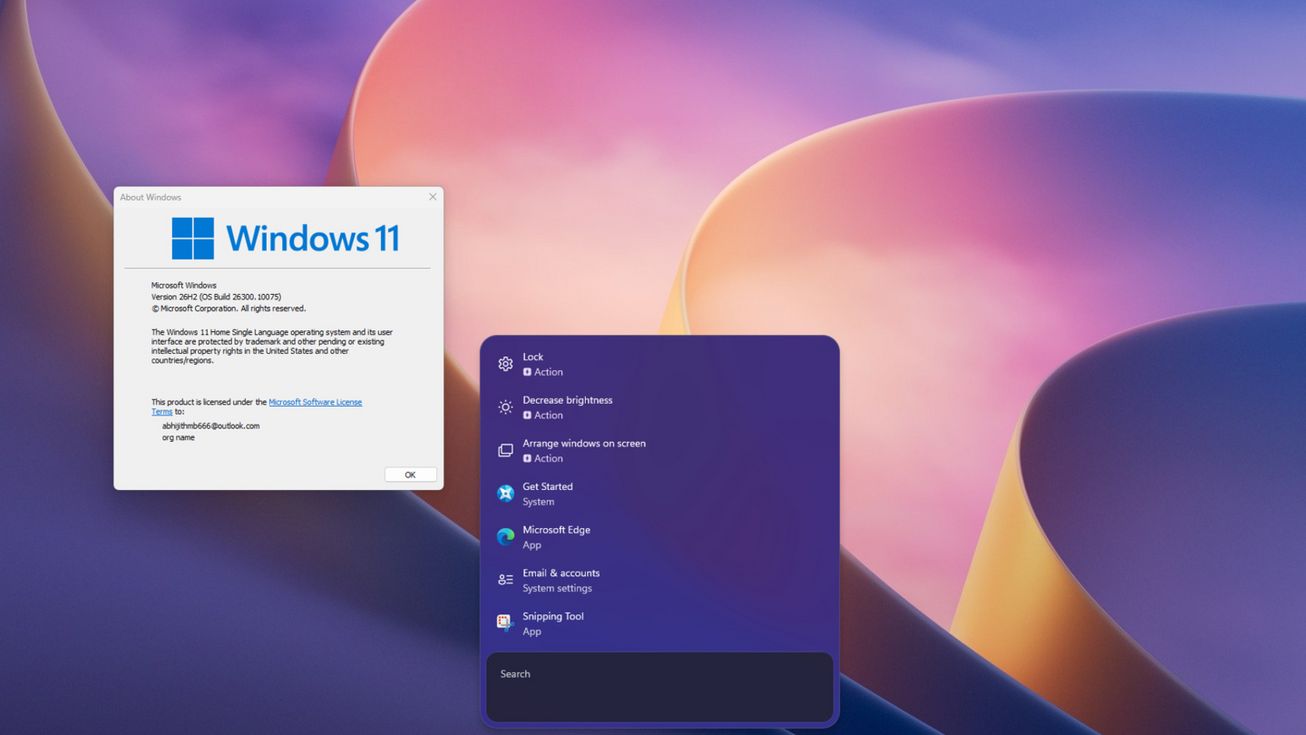
Windows 11 Search has been revamped with a native WinUI redesign available in the 26H2 update, delivering faster startup and lower memory usage. Microsoft is inviting select users to test the restructured search experience rolled out through the optional KB5132057 update.
Native WinUI 3 Revamp Improves Performance and UI
The refreshed Windows Search abandons the legacy WebView2 dependency in favor of a native UI built on WinUI 3, part of the Windows App SDK. This framework, using XAML and supporting C++ and C# development, offers modern Windows-style controls, layouts, and input management without relying on web container overhead.
Microsoft reports a 15% to 20% reduction in memory consumption depending on usage scenarios. Independent testing shows quicker search launch times and smoother typing responsiveness compared to the old interface.
New Features and Layout Enhancements
The redesigned search UI eliminates the large persistent preview pane on the right, instead offering a compact single-column results layout with a search box positioned at the bottom. The window size adjusts dynamically based on the number of results.
Despite a right-aligned taskbar, the new search window opens centered at the bottom of the screen. The update also integrates direct action controls within search results, letting users adjust display brightness, toggle dark mode, enable Bluetooth, or mute audio without opening Settings.
Since the feature isn’t globally available yet, users must install KB5132057 and enable it using the ViveTool command line tool with specific activation IDs. Compatibility requires Windows 11 build 26200.10075 or later.