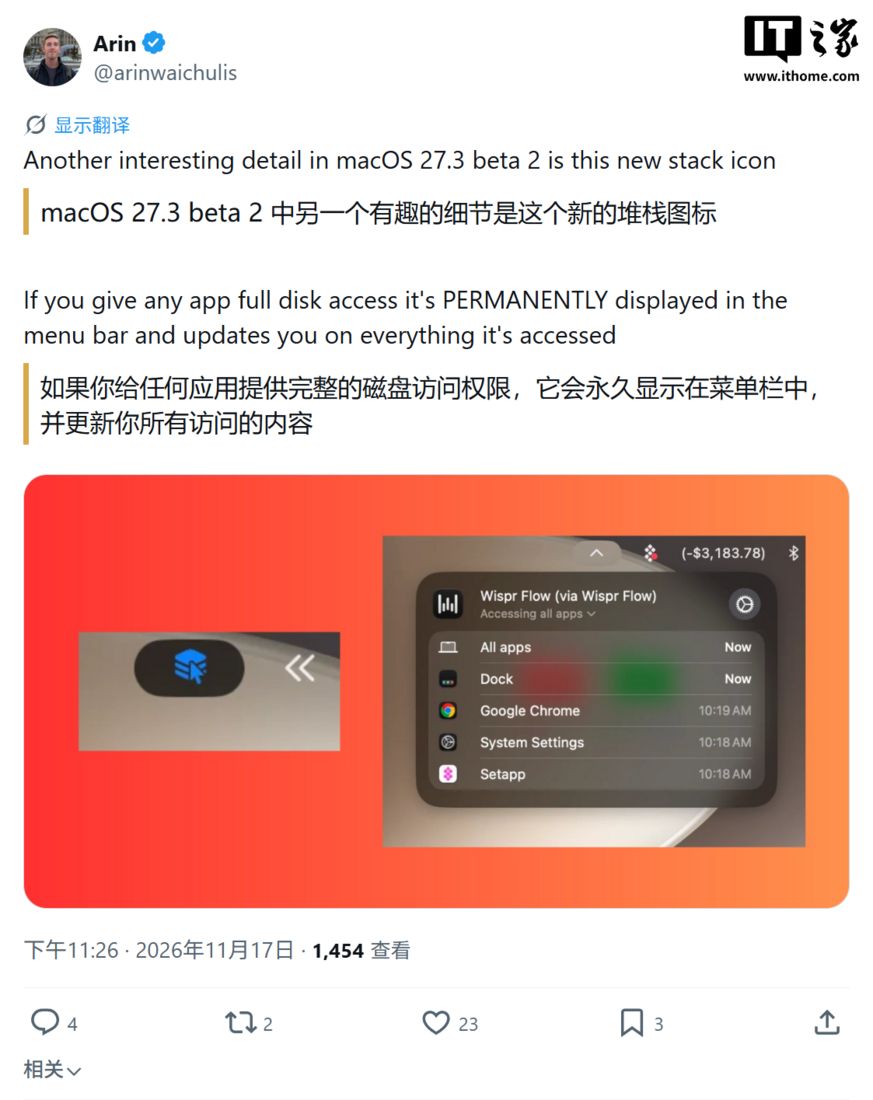
Mac users running the latest macOS 27.3 Beta 2 update might have noticed a new visual cue in their menu bar: a small blue indicator, sometimes referred to as a “blue pill.” This feature, introduced by Apple, is designed to provide transparency when an application is controlling another part of your system.
Understanding the “Transparency Indicator”
Apple states that this “transparency indicator” aims to enhance user awareness regarding the use of System & App Protection Override. Essentially, it’s a visual signal meant to inform you when an app is actively interacting with or controlling another application, a move intended to boost the transparency of automated operations.
However, for power users who frequently employ automation tools, window management software, or system enhancement utilities, this persistent blue indicator can become a visual nuisance. It may occupy valuable space in the menu bar, leading to what some perceive as an unnecessary distraction.
A Terminal Solution for the “Blue Pill”
Fortunately, a workaround has emerged for those who wish to disable this feature. Zac Hall, editor-in-chief of 9to5Mac, shared a command-line solution via X (formerly Twitter) on November 17th. This method involves using the Terminal application to create specific preference directories and then writing a configuration file that disables the indicator.
Here’s how to implement the solution:
- Open the Terminal application on your Mac.
- Copy and paste the following two commands into the Terminal window, pressing Enter after each one:
sudo mkdir -p /Library/Preferences/FeatureFlags/Domain
sudo defaults write /Library/Preferences/FeatureFlags/Domain/TCC AX_TRANSPARENCY_INDICATOR -dict Enabled -bool false
After executing these commands, you will likely be prompted to enter your administrator password. Once entered, you’ll need to restart your Mac for the changes to take effect.
Important Considerations
It’s crucial to understand that this terminal command only hides the visual indicator. It does not revoke any permissions that have already been granted to applications, nor does it remove them from your system’s permission lists. The underlying functionality and the control an app has over another remain unchanged; only the visual notification is suppressed.
While the blue pill served its purpose of informing users about app control, its implementation in macOS 27.3 Beta 2 has proven to be a point of contention for some. This command-line tweak offers a straightforward way to reclaim your menu bar’s aesthetics without compromising your Mac’s security or the functionality of your applications.