Google is rolling out a new version of its Clock app, version 9.1, with a revamped user interface. The update, part of the September Android Feature Drop, introduces several changes that could impact how users interact with the app, potentially disrupting established habits.
UI and Design Tweaks
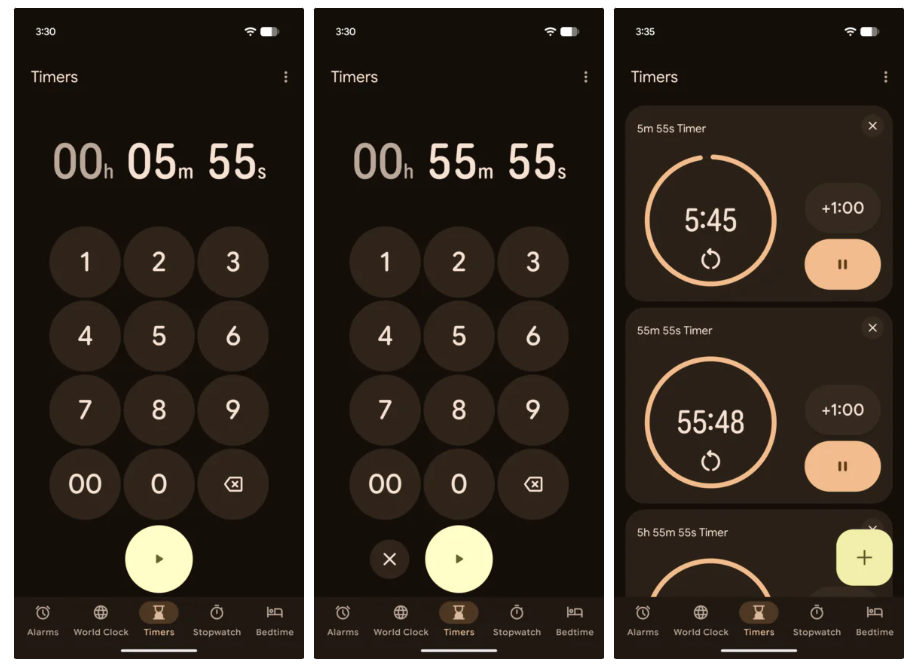
The visual overhaul sees a shift from the previous rounded aesthetic. In the older version, timer digits were soft and curved, and the number pad featured circular backgrounds for each digit. The new design adopts a flatter, sharper style for the number pad digits, removing the circular backgrounds entirely.
Enhanced Timer Functionality
A significant addition is the introduction of four preset shortcut buttons at the top of the interface: 1 minute, 5 minutes, 10 minutes, and 15 minutes. These are designed to allow users to quickly start commonly used timer durations with a single tap. Additionally, the ‘start’ button has been repositioned from below the number pad to above it.
Changes to Multiple Timer Management
Managing multiple timers has also seen a notable change. Previously, when multiple timers were set, they would stack vertically in cards with a close button at the bottom for easy switching. The new interface replaces this with a slide-up handle at the top of the cards. Users now need to swipe down to view other timers. Furthermore, multiple timers are now displayed in a grid layout instead of a vertical list.
Potential for Muscle Memory Disruption
According to reports, these changes, particularly the repositioned buttons and the new method for viewing multiple timers, might disrupt users’ established muscle memory. Those accustomed to the previous layout and interaction model may require a period of adjustment to adapt to the new system.
Phased Rollout
The update is currently in a grayscale testing phase. Users do not need to take any manual action, as the new interface will be automatically delivered to eligible users. This gradual rollout allows Google to monitor feedback and ensure a smoother transition for its user base.