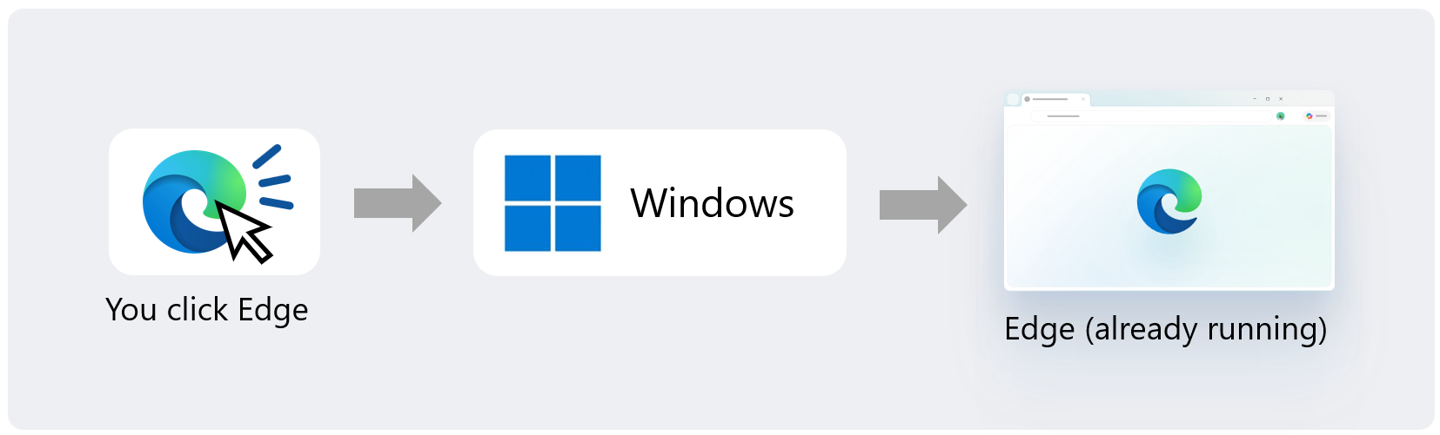
Microsoft has rolled out the latest stable version of its Edge browser, version 157, bringing with it a significant performance enhancement for app launches, though with specific OS requirements. This new feature, dubbed “Accelerated App Launch,” is designed to speed up how quickly applications, particularly Edge itself, become ready for use.
Optimized App Starts
The “Accelerated App Launch” feature primarily targets “hot starts,” a scenario where an application is already running in the background. Microsoft claims that under heavy multitasking loads, Edge’s launch speed can see an improvement of up to 33%, with an average increase of about 15%. The company is also exploring the application of this technology to accelerate the opening of PDF files.
It’s important to note that this performance boost is exclusive to specific versions of Windows 11. Users will need to be running Windows 11 versions 25H2, 26H1, or 26H2 to benefit from this feature. Additionally, the Edge browser must be updated to version 150 or a later release.
Key Updates in Edge 157
Beyond the headline-grabbing app launch acceleration, Edge 157 introduces several other notable changes and deprecations:
Phasing Out Native XSLT Support
Microsoft is gradually phasing out native XSLT support within the browser. Starting with Edge 157, this functionality will be disabled by default in the preview channels. The stable channel will see the same change beginning with Edge 159. Microsoft has indicated that exceptions provided through temporary policies and Origin Trials are planned to conclude around Edge 176.
Login System Migration
The browser is transitioning away from the older direct WAM (Windows Account Manager) login implementation to a new system called OneAuth. This migration is completed in Edge 157, and some users may be prompted to log in again to their accounts.
New Sign-In Option: Apple Accounts
In a move to enhance user convenience and accessibility, Edge 157 now supports signing in with Apple accounts. Alongside existing Microsoft account integration, users can now opt to use their Apple credentials to sign into the browser.
Enhanced Copilot Experience
The integration of Microsoft’s AI assistant, Copilot, continues to evolve. The new tab page receives an upgrade, merging the search and chat input fields and offering suggested actions and curated work content. The Copilot sidebar has also been streamlined with a simplified interface, updated icons, and the introduction of new capabilities like Copilot Voice and Vision, allowing for more interactive and multimodal engagement.
Feature Removals and Improvements
- The “Fade inactive tabs” feature, along with its associated settings, has been removed.
- Tab hover cards have been improved to more clearly display memory usage and the amount of memory saved when inactive tabs are released.
Managed Devices and Startup Behavior
For enterprise environments, Edge 157 introduces a new opt-in setting that allows administrators to control whether Edge automatically launches when Windows starts. This provides greater flexibility in managing device startup performance.
Bug Fixes and Enterprise Policies
The release also addresses several issues, including a fix for a problem where the browser would become unresponsive for extended periods when interacting with specific web applications while accessibility features were enabled. Furthermore, a range of new enterprise policies have been added, covering areas such as cloud management enrollment, Blueprint GWA availability, component updates, and proxy HTTP authentication.
Policy Deprecation
The BackForwardCacheForWebSocketsAllowed policy has been deprecated in this release.
Overall, Edge 157 represents a solid step forward, focusing on performance enhancements for Windows 11 users while continuing to refine the user experience and integrate AI capabilities.