Windows 11 Copilot is adding a new AI-powered file organizing tool designed to tidy up crowded folders like Downloads. With user authorization, this feature enables file searching, classification, moving, and renaming through natural language commands, streamlining file management.
Microsoft Demonstrates AI File Management at Ignite 2026
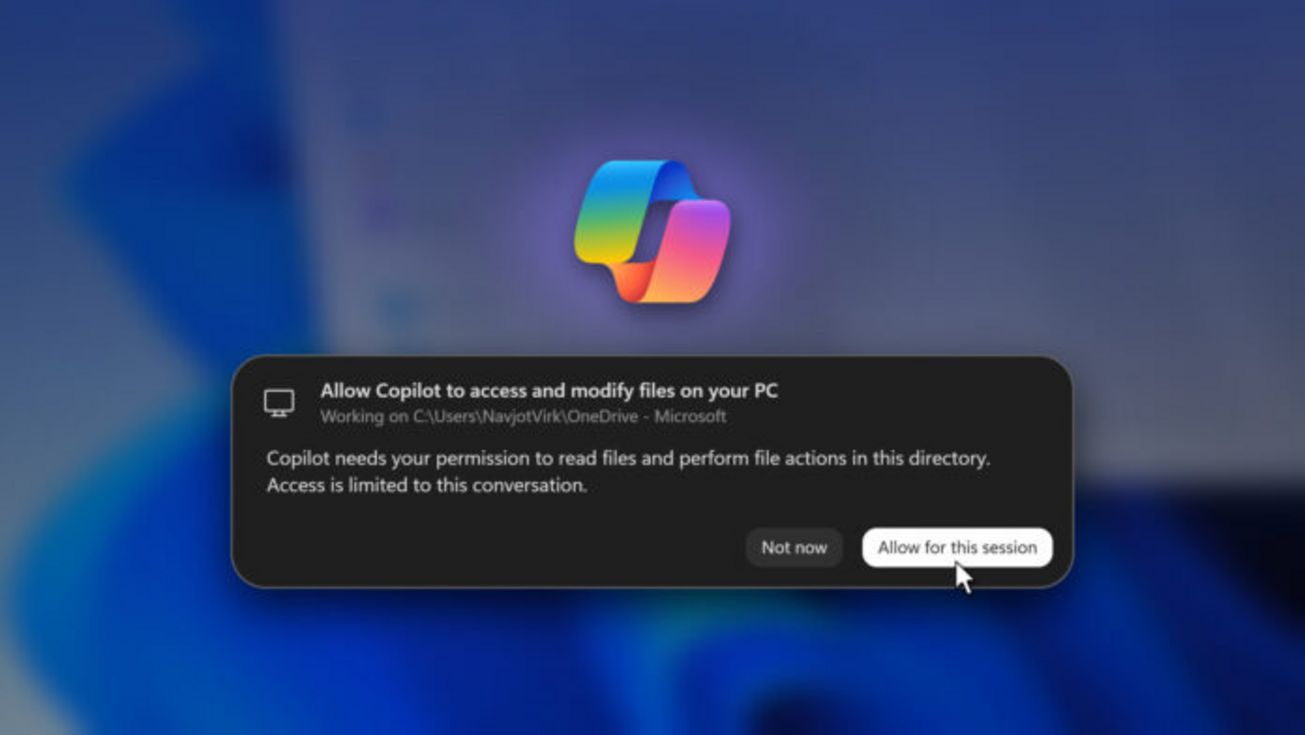
At the Ignite 2026 event, Microsoft showcased Copilot’s new “local file operation” capability. Once granted permission by the user, Copilot can efficiently scan specified directories, locate files, reorganize them into new folders, and rename files based on their content.
In a demo, Microsoft used Copilot to organize analyst reports located in the Downloads folder. The AI created a new “Analyst Reports” folder on OneDrive, moved eight related PDFs there, and summarized the actions with an undo option. Notably, Copilot identified relevant files not by filename, but by analyzing the document contents, removing the need for exact file name recall.
Privacy and Permission Controls for AI File Access
To protect privacy, the permission prompt offers only “Not now” and “Allow for this session” options, excluding any permanent access. Access is limited to the current session and the directory in question, preventing blanket permissions to the whole device. This careful design balances convenience with user control and security.
This update signals a smart step forward in integrating AI deeply into Windows 11 for improved everyday productivity.