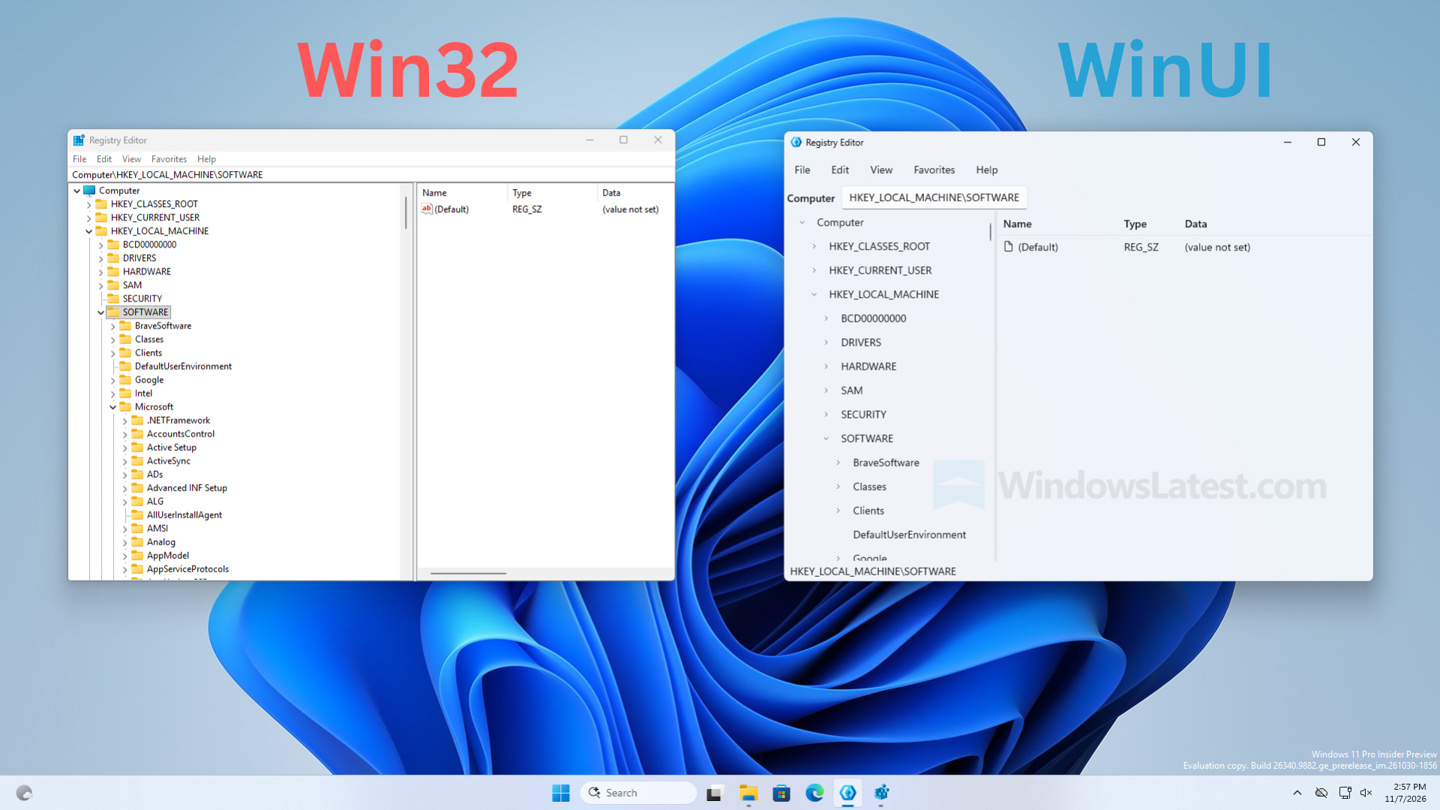
Microsoft’s long-standing Registry Editor, a tool virtually unchanged since the Windows 95 era, is finally getting a modern makeover. A native WinUI 3 version has surfaced in the Microsoft.UI.Reactor open-source project, offering a glimpse into a much-anticipated interface refresh.
A Modernized Interface
The new Registry Editor retains the familiar dual-pane layout of its predecessor but introduces significant visual improvements. Gone are the dated yellow folder icons in the tree view, replaced by a cleaner design. The address bar now utilizes a modern WinUI text box, and a status bar has been added at the bottom to display the current path. This overhaul brings the tool in line with the contemporary aesthetic of Windows 11.
Performance and Functionality
Testing on Windows 11 Build 26340.9882 reveals that the new WinUI 3 Registry Editor boasts impressive speed and smoothness, matching the performance of the classic regedit.exe. While expanding large sections like HKEY_CLASSES_ROOT might briefly show a “Loading” indicator, the content is populated quickly and efficiently. Crucially, core functionalities are present, with the editor successfully displaying existing registry entries and keys under HKEY_LOCAL_MACHINE\SOFTWARE.
Under the Hood: More Than Just a Facelift
Microsoft has emphasized that this is not merely a cosmetic update. Digging into the source code of the example project reveals a dedicated RegistryService class. This class leverages the .NET Microsoft.Win32 API for reading and writing to the registry, crucially incorporating error handling for permission issues. This prevents the application from crashing when attempting to access protected registry keys, a common frustration with the older version.
Feature Set and Future Prospects
The WinUI 3 Registry Editor already supports essential operations such as creating, renaming, and deleting registry keys. It also allows for the addition of various value types, including String, Binary, DWORD, QWORD, Multi-String, and Expandable String values. The much-needed search functionality (Ctrl+F) is also implemented.
However, some advanced features are still under development. Functions like network registry access, printing, loading hive files, and full export capabilities are not yet fully realized in this early iteration. These omissions suggest that the editor is still a work in progress, with further enhancements expected.
“This new Registry Editor represents a significant step forward, offering a much-needed modern experience for managing Windows system settings,” says an analyst familiar with Windows development.
The official mention of a new Registry Editor came from a Microsoft developer blog post in October, where the company promised to introduce sample applications the following month. This latest appearance provides the first visual confirmation and hands-on evidence of Microsoft’s commitment to modernizing this fundamental Windows utility.
While a release date for the stable version has not been announced, the availability of a functional WinUI 3 Registry Editor in the open-source repository signals Microsoft’s dedication to enhancing the user experience across its operating system.