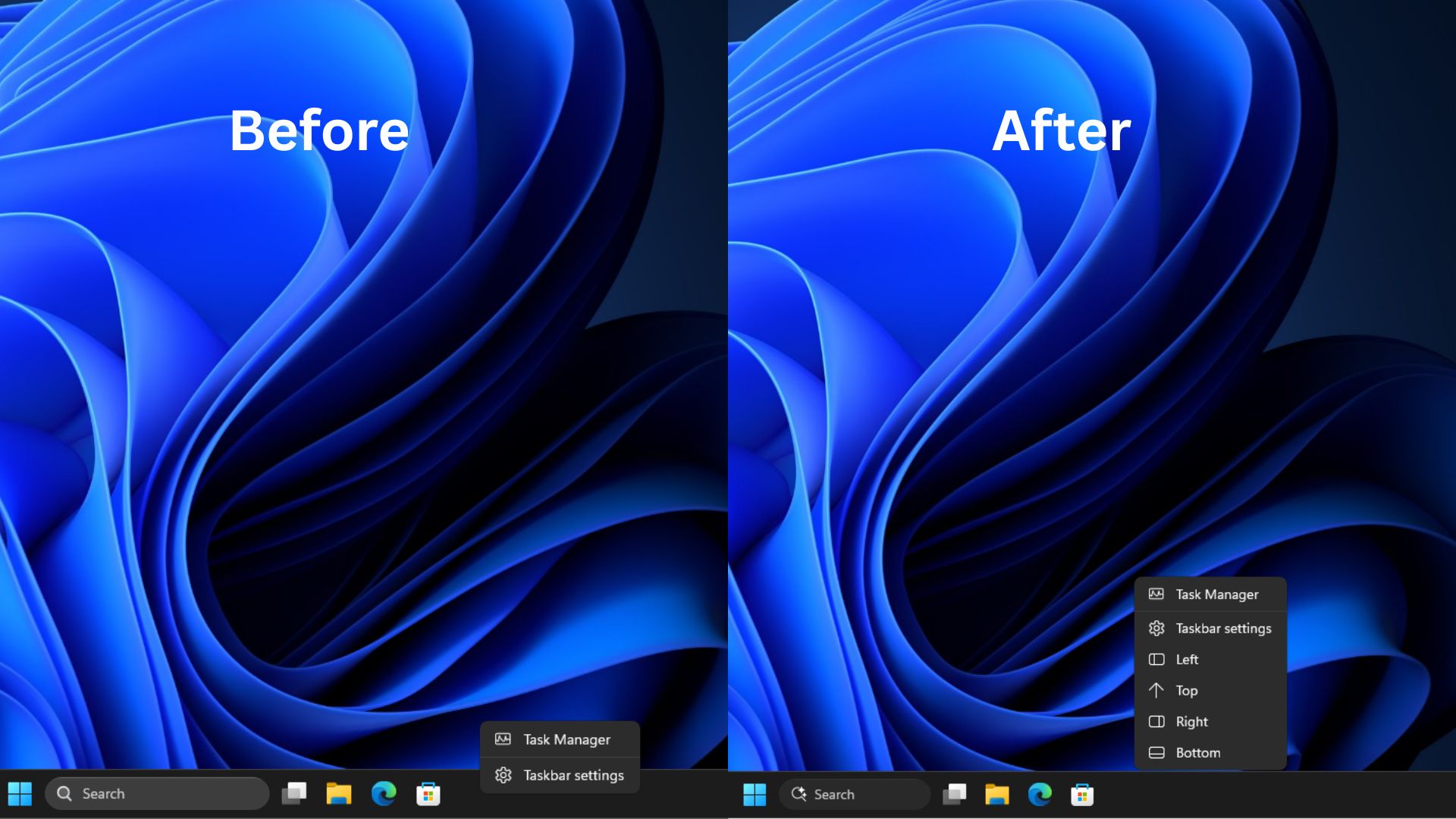
Microsoft is testing a new right-click menu for the Windows 11 taskbar that will allow users to quickly switch its position without diving into the Settings app. This feature was spotted in Windows 11 Build 26340.9750 preview.
Enhanced Taskbar Control Arrives in Preview
Currently, Windows 11 supports snapping the taskbar to any of the four edges of the screen (left, right, top, or bottom). However, changing this setting requires users to navigate through the Settings application. The existing desktop taskbar context menu only offers options for ‘Task Manager’ and ‘Taskbar settings’.
The new preview build introduces a revamped right-click menu that includes four distinct buttons: ‘Left,’ ‘Top,’ ‘Right,’ and ‘Bottom.’ This addition aims to provide a much faster and more intuitive way to reposition the taskbar directly from the desktop.
Windows Latest reported that testing of this new menu shows a swift response when switching taskbar positions, with no significant issues observed in application window scaling. However, a minor scaling anomaly might occur when the ‘Start’ menu is open during the position switch.
This functionality was previously seen in internal Microsoft engineering videos, where it was described as a debugging tool. Its appearance in a public preview build suggests that Microsoft is actively expanding its testing phase for this user-requested feature.
Still Lacking Windows 10 Features
Despite the welcome addition of a quicker taskbar repositioning method, the report from Windows Latest highlights that Windows 11’s taskbar still lags behind its Windows 10 predecessor in certain user experience aspects.
Specifically, the drag-and-drop functionality that was a staple in Windows 10 is notably absent in Windows 11’s current taskbar implementation. In Windows 10, users could freely drag and drop icons to rearrange them, adjust the taskbar’s height, and benefit from automatic side-hiding capabilities.
While Microsoft continues to refine the Windows 11 taskbar experience, bringing back familiar and convenient features like drag-and-drop functionality would likely be a significant improvement for many long-time Windows users.
The introduction of the right-click menu for taskbar snapping is a step in the right direction, offering more direct control and potentially saving users time. However, the ongoing comparison with Windows 10 serves as a reminder of the features that many still miss in the latest iteration of the operating system.