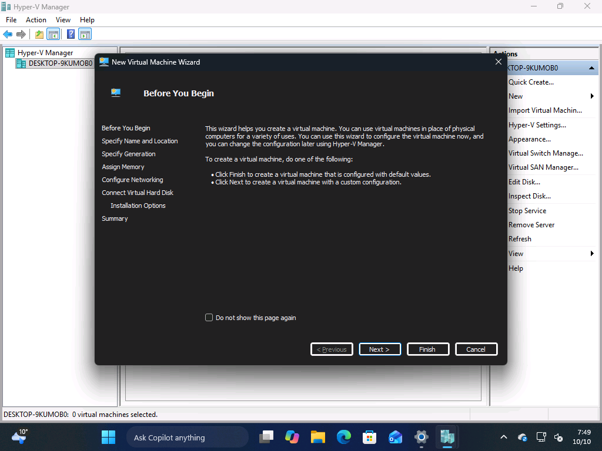
Microsoft is continuing its efforts to bring a more consistent dark mode experience across Windows 11, even to some of its oldest tools. In a recent development, the Hyper-V Manager, a cornerstone utility for virtualization on Windows, is set to receive dark mode support.
While Microsoft has been actively modernizing its interface with the WinUI framework, some legacy components require a different approach. Instead of a full overhaul, the company is opting to enable dark mode directly for these older components to improve user experience without a complete redesign.
This move follows similar updates where Microsoft has introduced dark mode to dialog boxes for file deletion and copying within Windows 11. Even the classic Windows Run dialog box has seen a dark mode-enabled version. Now, the focus shifts to deeply ingrained tools like Hyper-V Manager.
Hyper-V Manager Joins the Dark Side
The Hyper-V Manager has remained largely unchanged for years, often presenting a stark white interface even when the user’s system-wide dark mode setting was enabled. This inconsistency could be jarring for users who prefer a darker visual theme.
According to reports, Microsoft has implemented dark mode support in Hyper-V Manager by integrating dark mode appearances into its Win32 API. This means that rather than a full WinUI rewrite, the older framework is being adapted to accommodate the dark theme.
Currently, key dialog boxes within Hyper-V Manager, such as those for creating, exporting, and importing virtual machines, have begun to support dark mode. However, it’s noted that the overall interface still has some visual inconsistencies and requires further refinement.
Development in Progress
It’s important to understand that the dark mode implementation for Hyper-V Manager is still under development. Users will observe that while specific dialog windows are adapting to the dark theme, the main management interface and the virtual machine list predominantly retain their light appearance.
This phased approach allows Microsoft to gradually enhance the usability and aesthetic consistency of its tools. For users who rely on Hyper-V for managing virtual machines, this upcoming dark mode support will be a welcome enhancement, reducing eye strain and blending better with a modern, dark-themed desktop environment.
The continued rollout of dark mode to older utilities underscores Microsoft’s commitment to providing a more cohesive and visually appealing experience for all Windows users, regardless of the age of the specific application or component.