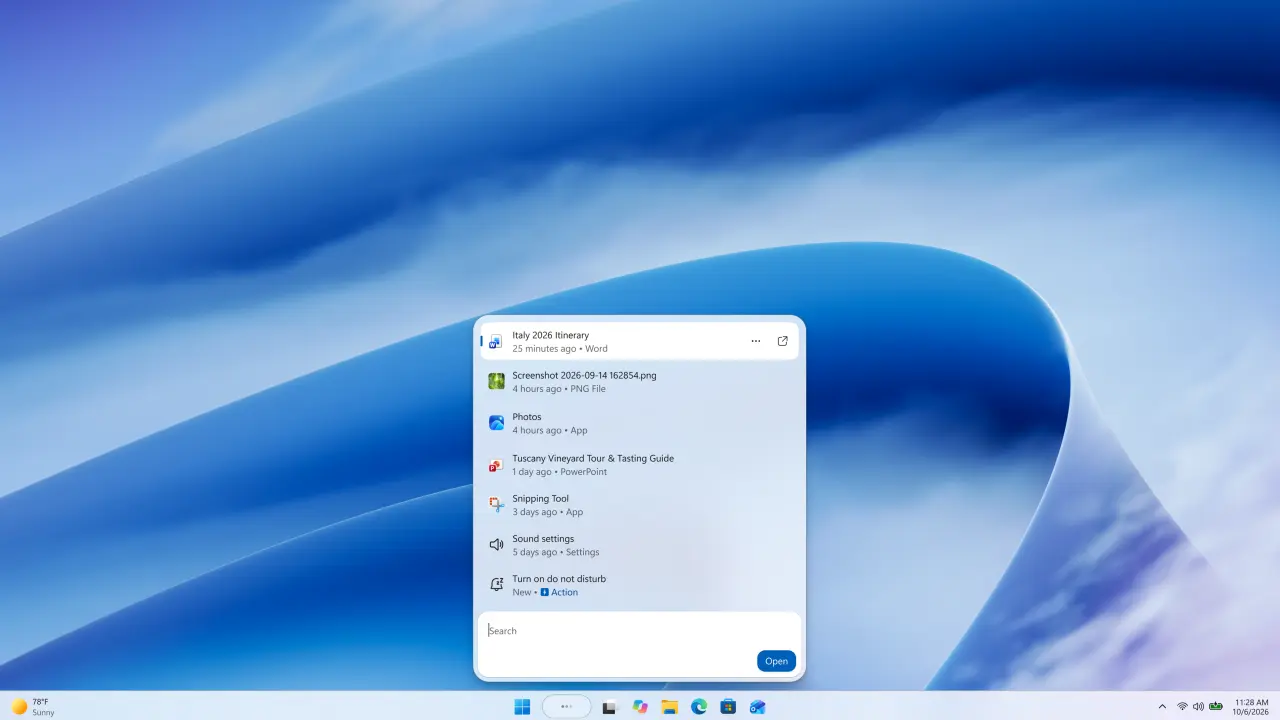
Microsoft’s latest Windows 11 Insider Preview Build, specifically version 26340.9616, is offering a glimpse into a significantly revamped search experience. Early testers are reporting a more fluid, compact interface and, more importantly, the ability to perform system-level actions using natural language commands directly within the search bar.
Seamless System Control
The core innovation highlighted is the introduction of “inline actions.” This feature allows users to execute high-frequency tasks without leaving the search interface. Commands like “switch to dark mode,” “turn on Bluetooth,” “dim screen,” “mute,” “minimize all windows,” and “arrange windows” are now directly actionable.
During testing, users observed that when a command is recognized, a dedicated action button appears next to the search results. This response is immediate, occurring as the user types, and notably, does not require submitting a query or show any loading indicators. After an action is performed, a convenient “Revert” button is presented, allowing for instant undo of the change.
Local Processing and Offline Prowess
Contrary to some initial concerns that these inline actions might rely heavily on cloud-based AI processing, tests on the preview build suggest otherwise. When actions like enabling flight mode or switching to dark mode were executed, the search behavior and response remained instantaneous without any discernible increase in GPU usage. This indicates that these requests are likely processed locally on the device, ensuring speed and privacy.
Further testing in an offline state confirmed the robustness of the new search. It remained fully functional and responsive, delivering near-instantaneous results even without an internet connection. This offline capability is a significant step forward, ensuring that core system controls are always accessible.
Understanding Nuance and Intent
The new search also appears to be gaining a better understanding of user intent, even with less precise phrasing. For instance, the command “dim everything” was interpreted as a request to switch to dark mode. Similarly, “turn off the lights” brought up options for Night Light and Dynamic Lighting. However, the system correctly ignored unrelated queries, such as “what should I eat for dinner?”
A More Compact and Fluid Interface
Beyond the functional enhancements, the visual design of the new search interface has also been refined. Testers describe it as more compact and streamlined, with smoother animations. Upon opening the search window, the taskbar search box shrinks, displaying three animated dots, while applications, files, folders, and settings can still be accessed through traditional clicks.
This evolution in Windows Search marks a shift from simply finding files and settings to actively understanding user intent and facilitating direct system control. The focus on local processing and offline functionality further enhances its utility and user trust.