Microsoft has officially launched a significantly revamped version of its Copilot AI assistant, rebranding it as a “super app” designed to integrate chat, coding, and intelligent agent capabilities into a single interface. This new iteration aims to redefine how professionals work in the AI era, drawing parallels to the productivity revolution Office brought to the PC era.
A Unified AI Experience
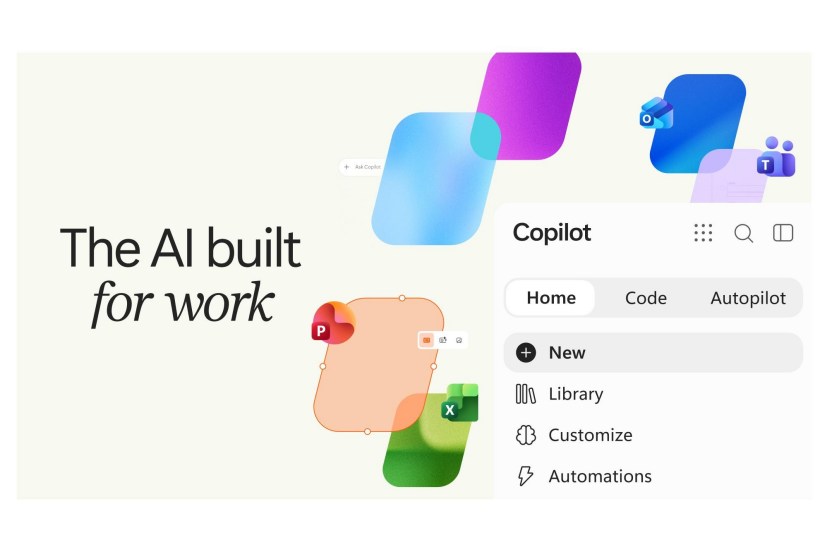
Jared Spataro, Microsoft’s Chief Marketing Officer for AI Work Business, stated, “Just as Office defined the way we work in the PC era, the new Copilot aims to define the way we work in the AI era.” The redesigned Copilot features three main tabs: Home, Code, and Autopilot.
Home: Your Personalized Work Hub
The Home tab merges Copilot Chat and Cowork, serving as the default landing page. Microsoft plans to enhance this section with a “Today” feature, offering a personalized dashboard of crucial work information, including important emails, meeting requests, and Teams discussions. Spataro explained, “Home helps you quickly get up to speed, so you know where you are and can keep moving forward: see what’s recent, understand what Copilot can help with, and pick up where you left off.”
Code: Empowering Development and Automation
A notable addition is the Code tab, which leverages the same underlying technology as GitHub Copilot. This feature allows users to create applications, trackers, dashboards, or automation workflows within a secure sandbox environment. These creations can then be shared with colleagues as internal cloud-based applications. This capability extends AI assistance beyond traditional knowledge work, offering tools for development and process automation.
Autopilot: Your Digital Teammate
Formerly known as Scout, Autopilot is positioned as a “digital teammate.” This cloud-based agent, originally a desktop application, can now perform tasks autonomously even when the user is offline. Autopilot operates with its own cloud compute instance, enabling it to monitor Teams channels, execute routine tasks, and follow up on action items. Users can even assign a name and appearance to their Autopilot agent.
Enterprise-Grade Security and Integration
Microsoft has built the new Copilot suite with enterprise standards in mind, targeting organizations that heavily rely on Office and Microsoft’s identity management solutions. Spataro highlighted Autopilot’s integration: “Autopilot runs in your tenant, has its own identity, memory, compute, and workspace, and is grounded in Microsoft IQ, so it understands how your organization actually works.” The agent can access Teams, Outlook, chat, channels, and documents, allowing users to interact with it similarly to how they would mention a colleague. The system also incorporates robust permission, auditing, and governance mechanisms.
Pricing and Availability
The Cowork, Code, and Autopilot features in the new Copilot will be priced based on usage. Ongoing agent functionalities and calls to models like Astra and Fable will incur charges according to actual consumption. Standard Copilot user subscriptions will cover Chat and Copilot functionalities within Word, Excel, PowerPoint, Outlook, and Teams.
Microsoft employs an automatic model selector to match the best model for each task. To manage expenses, IT administrators will use the new FinOps for AI tool to control AI spending and prevent uncontrolled agent usage.
Home and Code are slated for rollout to early adopters of Microsoft’s Frontier program in the coming weeks. Autopilot will enter private preview later this month. Code is also scheduled for preview access by Microsoft 365 Premium and Pro subscribers later this year.