Microsoft is reportedly working on a new feature for Windows 11 that will allow for more granular control over unified memory, specifically for graphics and AI tasks. This development, noted by Windows Latest, suggests a move towards optimizing system resources for demanding applications.
Unified Memory Explained
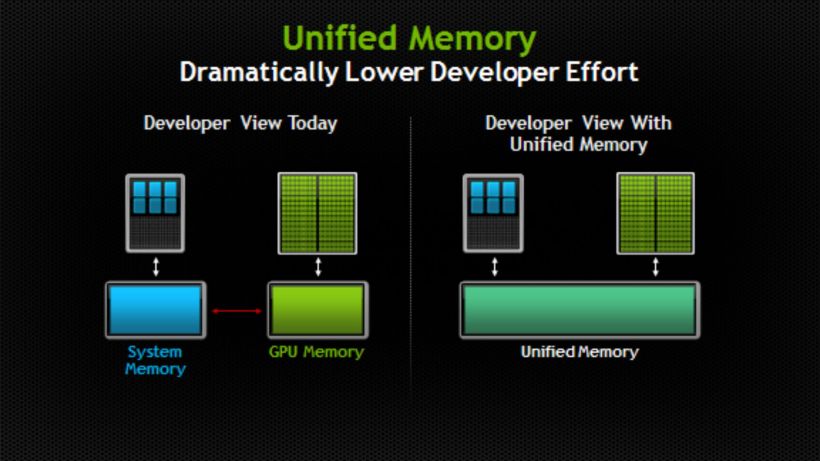
Unified memory refers to a system where the CPU, GPU, and other accelerators share a single pool of high-speed memory. This differs from traditional architectures where system RAM and dedicated video memory (VRAM) are kept separate. The key advantage of unified memory is its ability to allow local AI models, graphics-intensive operations, and regular applications to access a larger, shared memory space, potentially boosting performance and efficiency.
Devices like Apple’s Mac lineup are well-known for their use of unified memory architecture. Additionally, platforms such as AMD’s Ryzen AI Max “Halo” series and NVIDIA’s RTX Spark are incorporating similar designs, highlighting a growing trend in hardware design.
Intelligent Carveout in Windows 11
Evidence of this upcoming feature was discovered in the Windows 11 Build 29648.1000 preview version, released on August 17th. Hidden within this build is a feature identified by the ID 61121285, referred to as ‘IntelligentCarveout’. Alongside this, a new file named ‘SettingsHandlers_UnifiedMemory.dll’ has been added.
System strings found within the build explicitly mention ‘Accelerator reserved memory’ and ‘Graphics & AI accelerated memory’. These strings indicate that Windows will be capable of reserving additional unified memory for graphics, AI-intensive games, and applications. Critically, this reserved portion will not be available for other applications to use.
User Control and Future Implementation
While the exact implementation of these settings is still unclear, clues from the preview build suggest that users might gain control over how much unified memory is allocated. Potential interfaces could include sliders, fixed presets, or workload-specific configurations. It is speculated that this option might be located under Settings > System > Advanced.
Microsoft has not yet officially commented on this feature in their release notes, nor have they confirmed a definitive release date. However, the implications are significant: users would theoretically be able to adjust the reserved memory. This could allow them to free up more memory for general applications by reducing the reservation, or conversely, increase the reservation to better support local AI models and demanding graphical tasks.
This move by Microsoft signifies a deeper integration of hardware capabilities within Windows, aiming to provide a more tailored and efficient computing experience, especially as AI and graphics processing become increasingly integral to the modern user experience.